For cafes, bars, bakeries and owner-run kitchens

Find the dishes that are quietly eating your profit.

StockChecker turns supplier prices and the recipes in your head or notebook into clear menu decisions: what each dish costs, which prices need fixing, and where money is leaking.


See the workflow
14-day free trial · No setup fees · Plans from $49/mo
Know the margin before service Catch supplier hikes faster Food and bar in one app
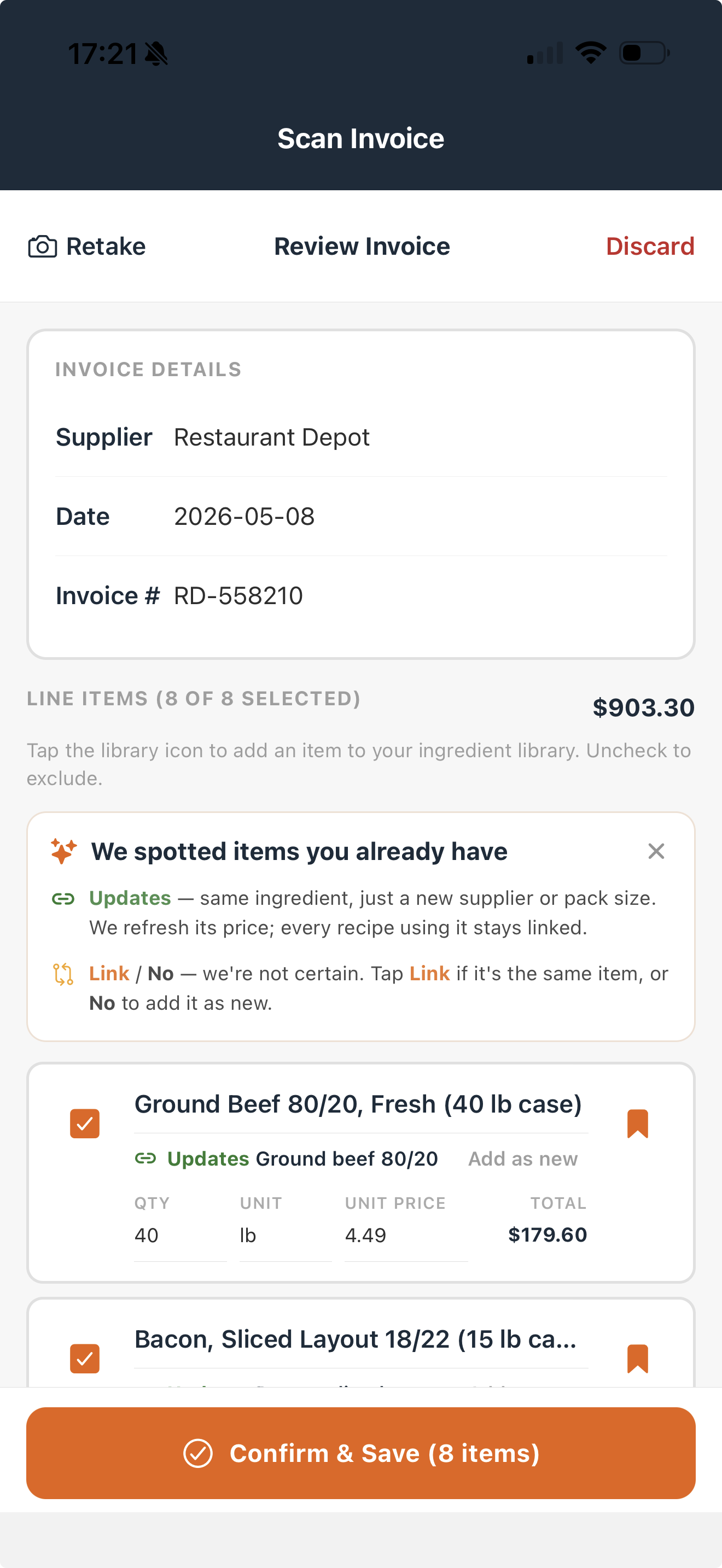
Invoice ReviewRestaurant Depot - page 1 of 2
OK
Restaurant Depot invoice review with invoice details, matched line items, and confirm save button
Voice RecipeChicken Cordon Bleu
AI
"Four portions: chicken breast, smoked ham, Swiss cheese, Dijon, flour, egg wash, breadcrumbs, butter..."
Chicken breast$2.40
Smoked ham$1.15
Swiss cheese$1.80
Breadcrumbs$0.42
Egg wash$0.28
Cost per portionSaved

$16.30

Profitability alert

48% food cost - 13 points over target

At $34, each sale misses your 35% target. Price near $46.50, or fix the recipe before more profit leaks out.

Current price$34
Suggested$46.50
1
Start on your phoneScan an invoice and cost a recipe without booking a demo.
2
You approve changesPrices and AI matches are shown to you before anything saves.
3
Built for small teamsMade for owners, chefs, and managers without a back-office team.
4
See each cost clearlyFood, drinks, packaging, and supplies are kept in their own lanes.
Dashboard

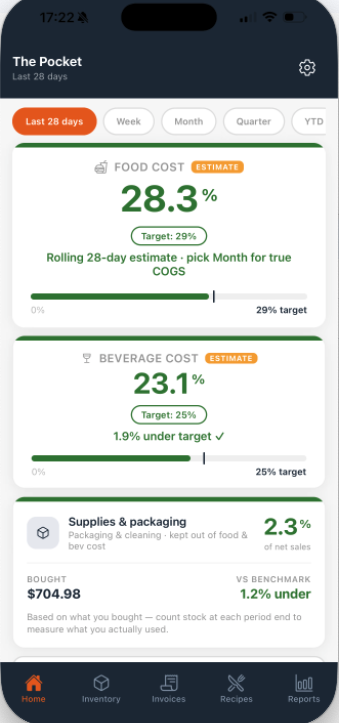
One screen for food cost, pour cost, and supplies.

Open the app and see the numbers you usually have to chase: what food is costing you, whether drinks are on track, and if packaging or cleaning supplies are creeping up.

Food cost28.3%
Beverage23.1%
Supplies2.3%
Know what needs fixing firstSee the cost that is closest to target, over target, or quietly moving the wrong way.
Keep food, drinks, and supplies apartYour bar and packaging costs do not get hidden inside the food-cost number.
Check it before the week gets awayA quick look tells you whether to review prices, stock, invoices, or recipes next.
StockChecker dashboard showing food cost, beverage cost, and supplies cost

Your daily cost check

See if food, drinks, or supplies are drifting before they turn into a month-end surprise.

How it works

Scan invoices. Cost recipes. See what needs fixing.

StockChecker joins the prices you pay to the recipes you sell. You can see what each dish costs, what stock is on hand, and where profit is leaking before another menu cycle goes by.

1

Scan the supplier invoice

Take a photo, check the lines, and approve the prices that should update your ingredient list.

2

Cost the recipe

Speak, scan, or type the dish. StockChecker shows cost per portion, food cost, and margin.

3

Check what needs attention

See food cost, pour cost, packaging, and supplies together so you know where to act first.

4

Count stock for the full picture

Stock counts show what you have left, so you can see what you used, not just what you bought.

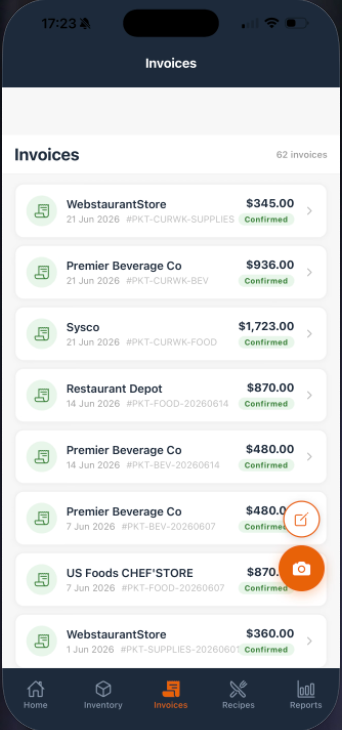
StockChecker invoice list with confirmed supplier invoices

Your latest prices, ready to use

Confirm an invoice once and those prices are ready for recipes, dashboard checks, and reports.

WebstaurantStore$345.00
Premier Beverage Co$936.00
StatusConfirmed
Invoices

Turn each supplier invoice into up-to-date recipe prices.

Take a photo of the invoice, check what StockChecker found, and save the prices you trust. Your recipes then use today’s costs instead of old guesses.

Check the invoice before it savesIf a price, date, product, or quantity looks wrong, fix it on the spot.
Update recipes without retypingWhen beef, cream, coffee, or spirits change price, the recipes using them can show the new cost.
Keep each spend in the right placeFood, drinks, packaging, and supplies stay separate so your numbers make sense later.
Less guesswork

Make the next price, special, or stock count with more confidence.

Price specials without guessing

Before you run the new dish, you can see what it costs and whether the price protects your margin.

Stock counts move faster

Use your phone, barcode scan, and simple count controls so stocktake does not sit on paper for days.

$

Know where money is slipping

Food, drinks, packaging, and stock all feed one clear picture, so you can fix the right thing first.

Recipe costing

Know what each dish costs before you sell it.

Add a recipe once and StockChecker shows the cost per portion, selling price, and whether that dish is priced safely using your latest invoice prices.

Find the weak dishes quicklySee the items that look busy but leave too little profit behind.
Cost dishes, prep, and drinks togetherSauces, batches, menu items, and cocktails all use the same ingredient prices.
Keep recipes currentWhen an invoice price changes, the dishes using that item can show the new cost.
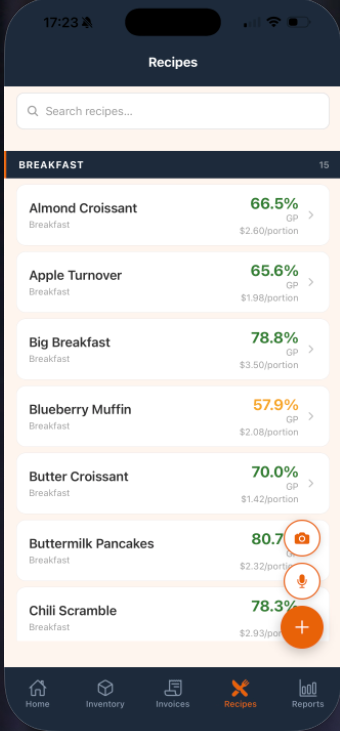
StockChecker recipes list showing gross profit percentages and cost per portion

Cost first. Then decide.

See the cost before the item hits the menu, then change the price, portion, or recipe while it is still easy.

Blueberry Muffin57.9% GP
Buttermilk Pancakes80.7% GP
The moment it earns its keep

"That $34 chicken special is running at 48% food cost."

A dish can look popular and still drain profit every time it sells. StockChecker shows the cost, the target, and the price that would put it back in range.

Catch it earlyFind weak recipes before they quietly run all month.
Fix it clearlyChange the price, portion, recipe, or supplier with the numbers in front of you.
Recipe profitability alert
48%This dish is 13 points over your 35% target. At the current price, every sale is working too hard for too little return.
Selling price$34.00
Cost per portion$16.30
Current food cost48%
Target food cost35%
Suggested selling price$46.50or adjust the portion, recipe, or supplier.
StockChecker recipes screen with camera and microphone actions

Speak the recipe as you would say it

"Big breakfast, two eggs, bacon, sausage, sourdough, hash brown..."

Detected ingredients7
Review stepBefore save

No typing it all out

Speak it or photograph it, check the ingredients, then save it as a recipe you can cost.

Voice and scan

Speak or scan a recipe instead of typing it out.

Tell StockChecker the dish, or photograph a written recipe. It turns the ingredients into something you can check, price, and save.

Capture it while it is freshSay the portions, ingredients, and notes before the details get lost during service.
Check it before it savesYou can review the ingredients and matches before the recipe becomes a costed item.
Finish it even if something is missingIf an ingredient needs a price or match, StockChecker shows you instead of hiding it.
Built for real service

Useful numbers, even when the day does not go to plan.

📸

Check the photo before it saves.

If the invoice shot is unclear, retake it first. You only save the prices after you have checked them.

Add a missing ingredient quickly.

If a recipe needs something new, add it and keep going. You can replace rough prices when the real invoice arrives.

Supplier names do not create duplicates.

If one supplier calls it “ground beef” and another calls it “beef mince,” StockChecker helps link it to the same item.

!

You can see what is estimated.

If a cost is not final yet, it is marked clearly so you know what still needs an invoice, sale, or stock count.

🍸

Food and drinks stay separate.

Cocktails, pour cost, liquor invoices, and bottle counts sit beside food, not mixed into food cost.

📊

Reports show the numbers to fix.

See food cost, drink cost, purchases, supplies, COGS, and low-margin recipes without digging through spreadsheets.

Inventory counts

Count the whole kitchen, or just the stock that matters today.

Use your device to count stock where it sits: the bar, fridge, dry store, or one expensive item you want to check now. No loose paper, no retyping it later.

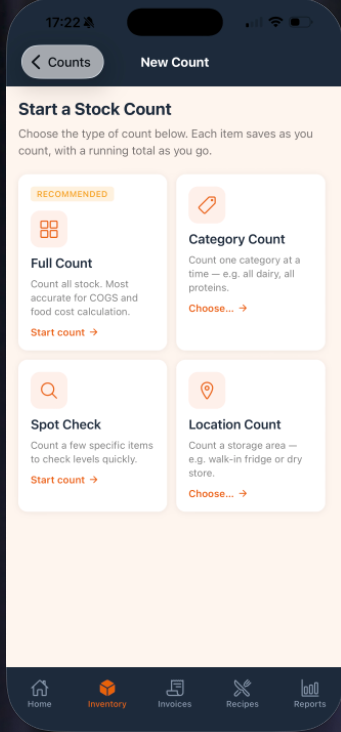
Choose the count you needCount everything, one category, one location, or just the items you want to spot check.
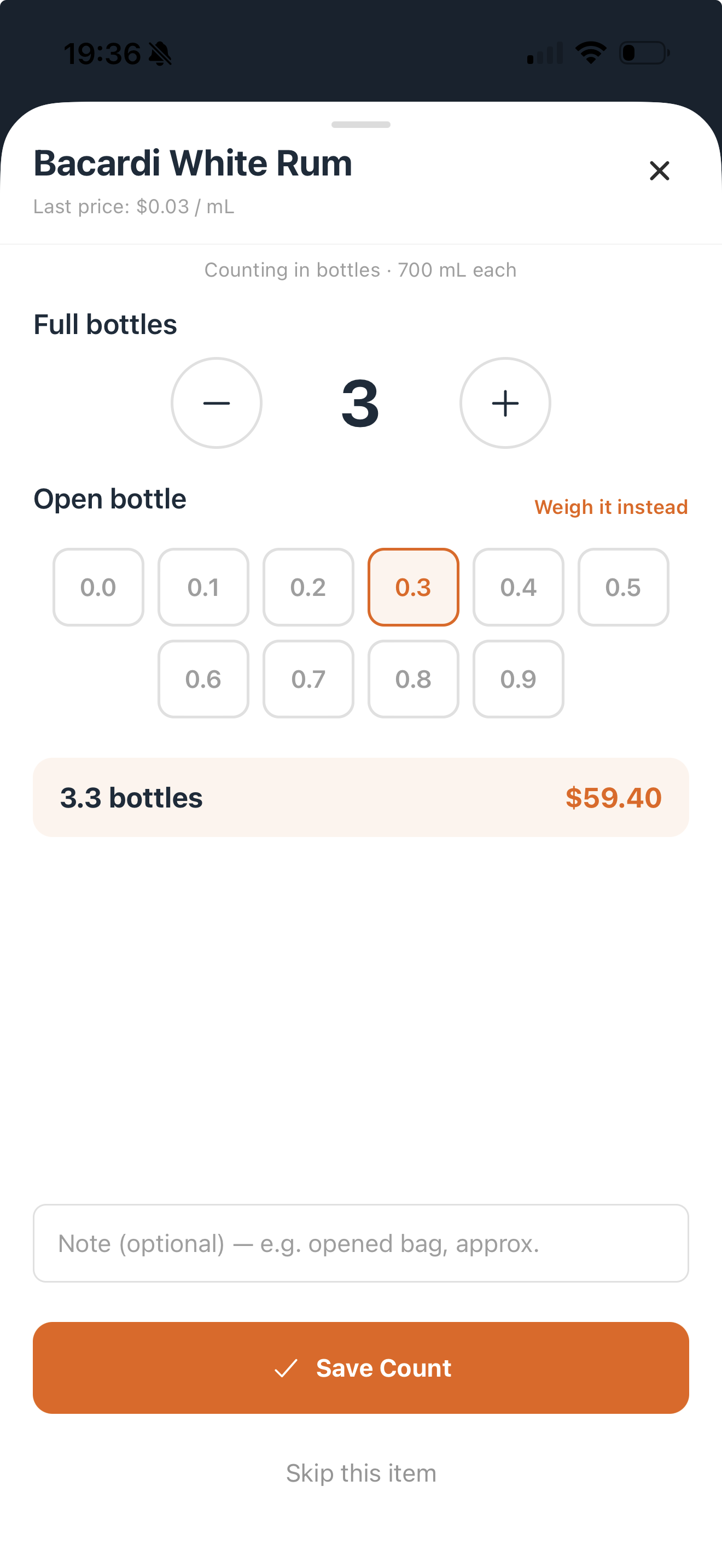
Spot check high-value stock fastFind Bacardi, proteins, coffee, or packaging, count it, save it, and keep moving.
Count bottles without guessingUse full bottles plus open-bottle amounts like 0.3, or weigh it instead when that is easier.
StockChecker new stock count type picker
Bacardi White Rum stock count with full bottles, open bottle fractions, and save count button
Made for your kind of place

The owner-run kitchen finally gets its numbers back.

One or two locations. A small team. Big pressure on every dollar. StockChecker is for the person who sees the invoices, knows the recipes, and still has to make service work.

CafesSee what milk, coffee, eggs, bacon and specials are doing to breakfast margins.
🍞
BakeriesCost batches, yields, doughs, fillings and staple price changes before they compound.
🍸
Bars & pubsTrack pour cost, cocktail recipes, partial bottles, liquor invoices and food together.
🥡
TakeawaysWatch packaging, high-volume items and supplier hikes before volume hides the damage.
🍽
RestaurantsGet practical menu costing control without an enterprise setup project.
What StockChecker helps you control

See what is costing you money, then know what to fix.

Price control

Keep supplier prices up to date

Scan an invoice, check the lines, and save the prices you want your recipes to use.

Recipe costing

Know what every dish costs

Cost menu items, prep batches, and drinks so you can price them before they hurt your margin.

Stock counts

Count stock without the paperwork

Find items fast, count bottles or ingredients, and save each line as you go.

Dashboard

See food, drinks, and supplies in one place

Open the app and see where your main costs sit, instead of chasing separate notes and spreadsheets.

Alerts

Spot dishes that need attention

See when a dish is priced too low, a cost has moved, or a recipe is slipping past your target.

Bar costing

Keep drinks out of food cost

Track bar stock, bottle counts, and drink recipes separately so your food numbers stay clean.

Supplies

See packaging and cleaning spend

Keep takeaway boxes, napkins, and cleaning supplies visible without mixing them into recipe costs.

Reports

Start with the fixes that matter

See weak dishes, rising purchases, and cost changes first, so your next action is obvious.

Built for smaller operators

Cost control without the heavy setup.

StockChecker is made for the team that needs clear numbers quickly: scan invoices, cost recipes, count stock, and see what needs fixing.

Typical large systemsStockChecker
$PriceOften $199-$350+ per monthFrom $49/mo
1StartUsually demo, setup, and training firstStart with one invoice and one recipe
+InputOften built around desktop data entryUse camera, voice, barcode, then review
SBuilt forDesigned around back-office teamsMade for owners, chefs, and small teams
=CostsFood, bar, and supplies may sit in separate placesFood, drinks, and supplies stay clear in one app
Pricing

Start free. Stay only if it finds the money.

14-day free trial, no card. No setup fees, no invoice-scan limits, and monthly plans you can cancel.

Solo

$39/mo
or $49/mo billed monthly

For the solo owner-operator who wants the core costing system.

  • 1 user, 1 location
  • Invoice scanning
  • Manual recipe entry
  • Food, beverage, supplies tracking
Start Solo free

Pro

$63/mo
or $79/mo billed monthly

For operators who want to speak or scan recipes instead of typing them.

  • 2 users, 1 location
  • Everything in Solo
  • Voice recipes
  • Scanned recipe extraction
Try Pro free

Growth

$119/mo
or $149/mo billed monthly

For growing independents with multiple sites and deeper reporting needs.

  • 10 users, 5 locations
  • Advanced reporting
  • Price alerts
  • Multi-site controls
Start Growth free

Voice and scanned recipes are included during the trial. After trial, voice is available on Pro and above.

Why we built it

Food cost control should not need a finance department.

StockChecker is for the cafe, bar, bakery, or restaurant that needs clear numbers without another spreadsheet project. Start with the invoices and recipes you already have, then see which prices, dishes, and counts need attention.

- The StockChecker team
Your data stays yoursYour invoices, prices, recipes, sales, and stock counts stay private to your account.
AI
AI helps. You stay in control.Scanned invoices and spoken recipes are shown back to you before anything is saved.
%
The app tells you what it knowsIf a number is still an estimate, StockChecker labels it clearly so you know what to check next.
FAQ

Questions a busy operator would ask.

Yes. Start with one invoice and one recipe. The first win is recipe cost per portion and food cost %. The full business food-cost picture gets more accurate as you add invoices, sales, and stock counts.

No. Scanned invoices are shown back to you first. You can edit quantities, units, prices, and product matches before saving.

You can quick-add it, mark it estimated, or leave it as needing a price. The recipe stays usable, and the app makes soft numbers clear until a real invoice replaces them.

Voice and scanned recipe extraction need an internet connection because they use AI processing. Barcode scanning is on-device, and offline stock-count sync is part of the product roadmap.

It handles both. Beverage pour cost, cocktail recipes, liquor invoices, and partial-bottle counts are tracked separately from food cost.

Use the App Store or Google Play buttons on this page. The same account can be used across your team based on your plan.

Plans start at $49/mo for Solo, with Pro, Team, and Growth plans for voice recipes, teams, and multi-site use. No setup fees and no invoice-scan limits.

Find one dish to fix this week.

Start with an invoice and a recipe you already know. StockChecker shows what it costs, where the price is wrong, and what to do next.

Review the workflow
14-day free trial · No setup fees · Built for independent kitchens.